‘LLM-as-a-judge’ bolts LLMs into traditional search evaluation. With the same eval headaches, only faster.
LLM judges take over search labeling from humans. They label results as relevant / not for specific queries. Then we continue on, business as usual, with the traditional search metrics (NDCG, etc). It feels like a half-measure. We’re doing to search evaluation what Github copilot did to AI coding. A way to bolt on AI into an existing workflow, not completely rethink it.
Crucially, we ignore the user interface’s foundational importance to search quality. As we’ll discuss, ranking evaluation assumes we can cleanly separate ranking from UI. Which leads to consistently disappointing results where ranking wins don’t translate to A/B test success.
I’m going to discuss an alternative philosophy. Moving away LLM as a judge and towards tasking agents driving the search UI directly. Not as a replacement for human interactions. But as a better way to leverage LLM feedback.
The old search eval regime
The typical search evaluation regime labels some results relevant / not in a judgment list. IE for a query shoes you have:
| query | document | grade (1-5) |
|---|---|---|
| shoe | red shoe | 5 |
| shoe | blue socks | 3 |
| shoe | slippers | 4 |
| shoe | trousers | 1 |
We label using humans, LLMs, clicks, whatever. With LLMs, we label results to fit some rubric of what ‘relevant’ means. Of course, with LLM judges, we employ one of many methods to evaluate results.
Regardless, with labels, later, our retrieval algorithm fetches some search results for shoes:
| query | document | grade (1-5) |
|---|---|---|
| shoe | trousers | 1 |
| shoe | slippers | 4 |
| shoe | blue socks | 3 |
| shoe | red shoe | 5 |
We evaluate this ranked set of results with the usual suspects (NDCG, etc). We see the grade=1 towards the top, and a grade=5 towards the bottom. Seeing a lower NDCG, we dismiss this as garbage search results.
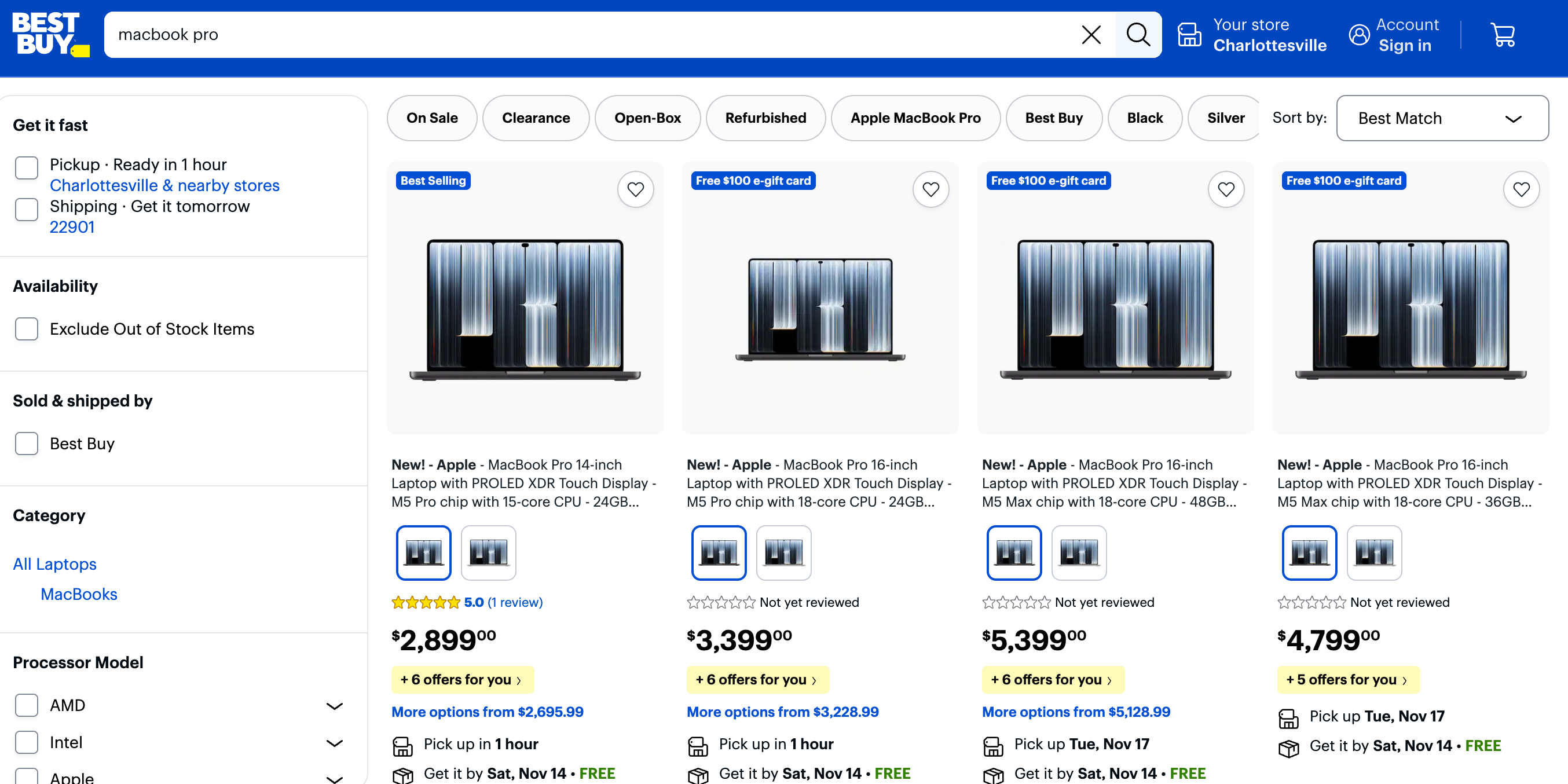
But search UIs vary tremendously. We’ve got grids like Best Buy:
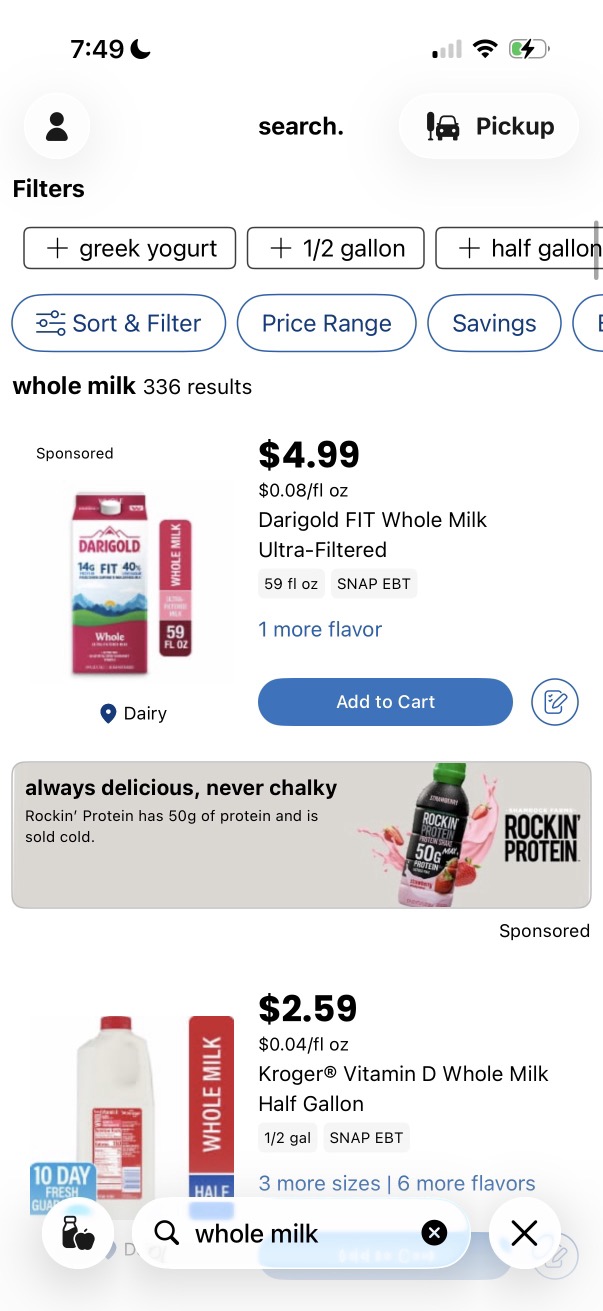
Or vertical, mobile listings, with only 1-2 items above the fold, like Kroger:
Or weird combinations of media types, like Reddit:
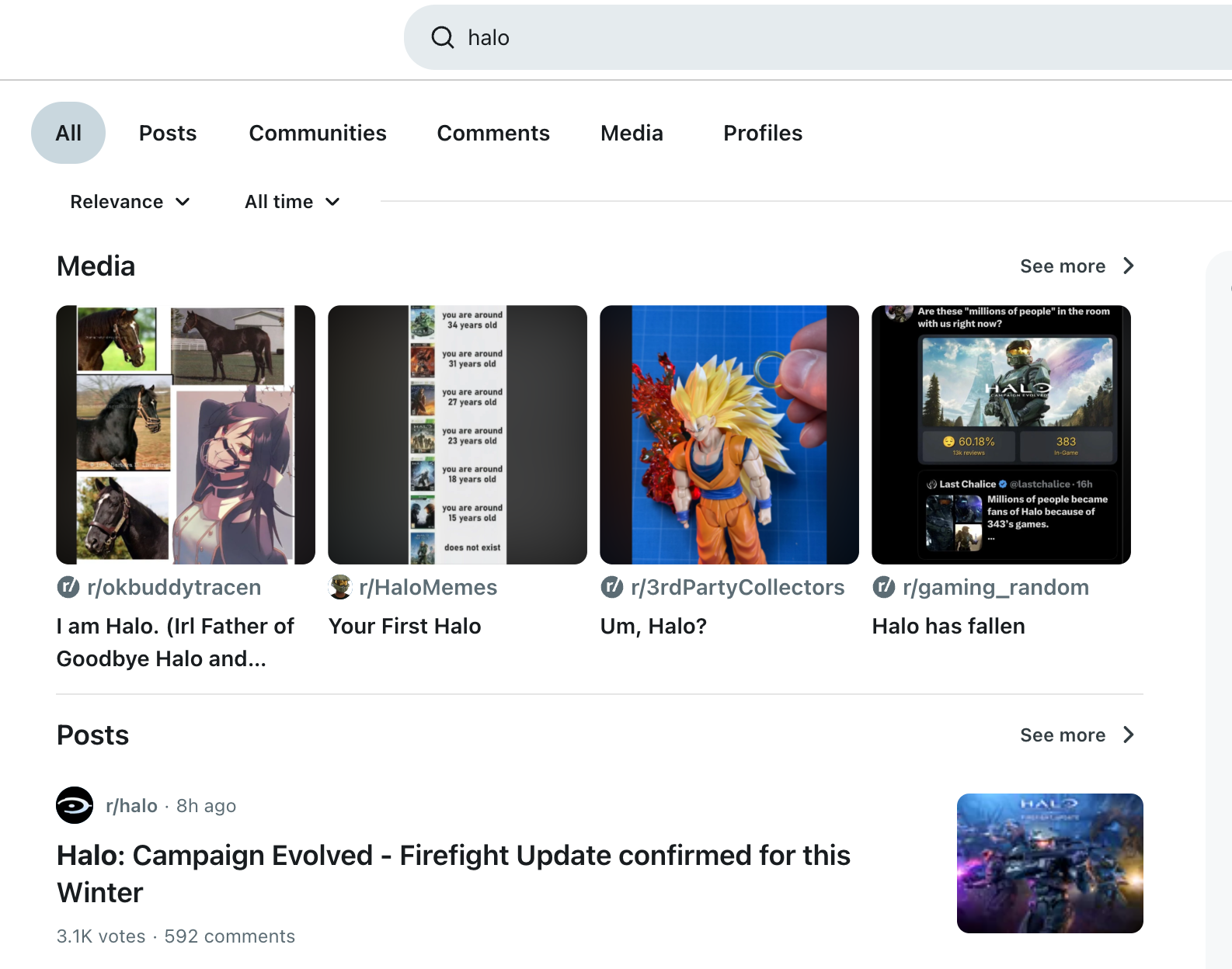
Putting a grade=1 in a grid’s first slot won’t completely tank the experience. Putting irrelevant results in the first slot of a vertical search UI creates serious problems. That’s why typically the answer goes “pick an evaluation metric that approximates the UI”. A metric like Precision doesn’t take into account position, maybe it’s appropriate for the grid? But for the scrollable search UI, we might choose NDCG. Because it DOES weigh the importance of the top position higher.
Whatever metric you pick, it’s like assuming the UI is a spherical chicken in a vacuum. NDCG seems to stand in for ‘some kind of ranky-UI’. A nice theory approximating a messy reality.
I’ve worked in search ranking. And it feels like we’ve danced around this problem. Search UIs only get less predictable. They’re not beautifully spherical chickens. But a diverse set of strangely shaped chickens and other funny birds.
Towards agentic search evaluation
For offline search evaluation, I’ve increasingly taken a different approach. Lately, I reimplemented movie theater chain Alamo Drafthouse’s menu search for fun. Instead of LLM as a judge, or judgments at all, I let a coding agent simulate user traffic. I run an agentic A/B on my laptop.
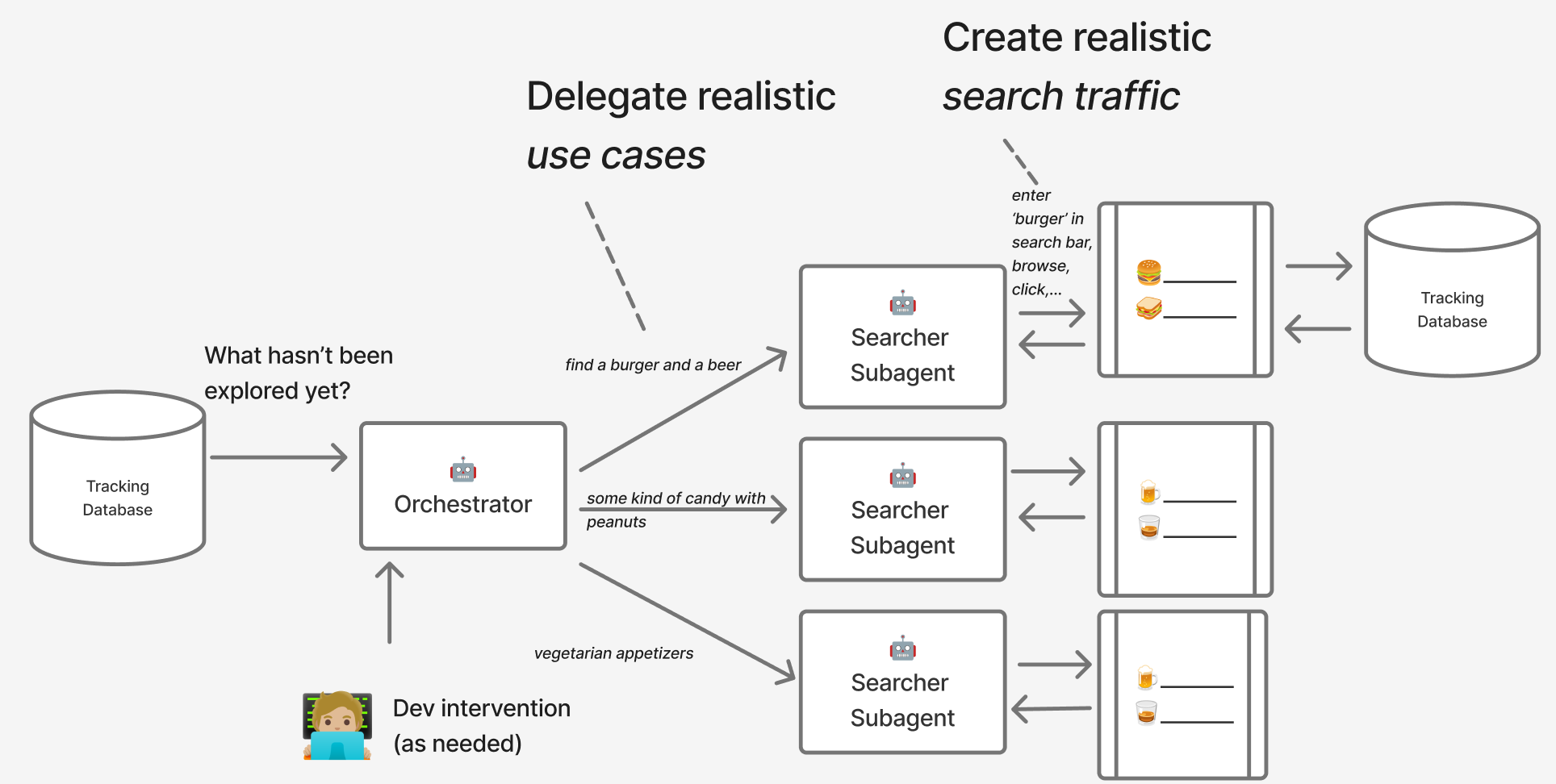
On client projects, I often vibe-code a facsimile of my client’s search UI. I recreate the ranking as best I can. I improve it using traditional search evals (judgments). I extend judgments by letting LLMs rate results.
But with an app, and agents, I can just let the agent drive the UI. Why measure search effectiveness through theoretical models when simulated users interacting with real apps has become so easy?
To enable this, I bootstrap a tracking database with my vibe-coded app. I track search sessions, search results that receive impressions, and record what was clicked. I evaluate agents search usage through the same tools I’d use to measure human behavior.
As shown in the diagram above, this involves an outer orchestrator scanning the tracking database for use-cases not yet explored. The orchestrator assigns those use cases to an inner subagent that drives the browser through Playwright - searching, scrolling, and clicking what looks promising.
The outer orchestrator acts like a long-horizon agent. That’s fancy talk for a cron job executing my coding agent (OpenCode) with a prompt. OpenCode wakes up, receives the prompt below. Before starting, it scans its environment. Through the repo’s AGENTS.md and other documentation, it sees it’s in a repo with a search UI and tracking database. Based on the prompt’s instructions, it interacts with the tracking database and prepares new use-cases to simulate. It delegates them to subagents, waits for them to complete, then cleans up.
You're orchestrating menu-searcher subagent to generate synthetic traffic for the app
running at 127.0.01:8000

Generate search scenarios around the provided theme. Assign them to menu-searcher subagents and
let them use Playwright to generate synthetic traffic + clicks.

Spawn about 10 subagents to let them try different scenarios.

## What to do when done

When you're done, query the database, show the top clicked item per search query,
ordered by search query frequency first, then query string, then top clicked documents
(doc_id and product name)

When you're done, clean up the spawned pupeteer chrome windows
The inner menu-searcher subagent lives a different life. It spins up, discovers its environment, and sees it has access to a headless Puppeteer MCP, as configured in the repo’s opencode.json:
{
  "$schema": "https://opencode.ai/config.json",
  "mcp": {
    "playwright": {
      "type": "local",
      "command": [
        "npx",
        "-y",
        "@playwright/mcp",
        "--headless",
      ],
      "enabled": true
    }
  }
}
The inner subagent starts with a system prompt as follows:
We need to gather simulated web traffic on a simulated Alamo Drafthouse menu to improve its
search relevance. Your job is to create that traffic for a specific scenarios or queries.

You are one simulated menu searcher. The orchestrator will give you a scenario and/or a search query
along with a URL to the Alamo Drafthouse menu.

Act as if you're a patron trying to find specific menu item. Scroll down and click on relevant menu
items as you find them. (this is important, as the clicks help us learn whats relevant). Do not
click on irrelevant items.

## How to search

This is a 'search as you type' interface. Meaning you should try prefixes, etc of your query.

Use the Playwright browser tools to interact with the webapp. Issue searches (either as directly
instructed, or searches you think are appropriate for the scenario)

If your attempted searches do not return any results, try to modify your search query to find relevant items.
Keep persisting like a normal, hungry patron would, until you find something you like! Then click on it.
From the orchestrator, the inner subagent receives a user prompt with the orchestrator’s assigned use-case (i.e. burger with beer).
Once I’ve simulated traffic, I can answer quantitative questions like
- For each search session, how many impressions were used / ignored before we received a click?
- Does a different search layout (UI or ranking) bring relevant items close to top of the ranking, with fewer wasted impressions?
- How many queries did the agent issue before finding what it wanted? Is it beyond reasonable effort a human searcher would undertake?
- Does the agent have a preference when using two variants?
I switch more to a session-based evaluation framework. In other words, look at each struggles of individual users solving problems. Did the UI and ranking helped the user find what they needed? That differs from the judgment regime, where we try to aggregate all sessions to discover the most relevant result per-query. I can still hold the UI constant, and try to improve these measurables by just changing ranking, but I’m working closer to the experience of users.
Generally, this works! With some challenges.
Challenges to agentic traffic
Stochasticity is a big one. If you give an GPT-6 Luna agent the task of searching for burger and clicking relevant results, it always clicks the same result. (in my case, always a double cheeseburger). It ignores the half-a-dozen other burgers on the menu. That limits what we can learn - we want information about all possible relevant results.
Two workarounds seem to help. First, varying models beyond one provider - i.e. Anthropic Opus vs GPT-5.6 act like different personas. These models have different criteria / preferences, so often make different choices.
The second is a simple modification to the orchestrator prompt to generate / assign a random number to each subagent. The subagent will then look for the Nth most random item. The orchestrator seems to draw these reliably in my observation - using a python code snippet to select a pseudo-random number.
## Ensuring stochasticitiy

Generate variations and try things not explored yet, based on scanning the database.

Draw a random number, N, randomly from 1-3 when giving the subagent
a task and request that it click the Nth most relevant items. This helps
generate stochastic clicks.
Second, the orchestrator doesn’t always select realistic use-cases. I’ve found it still takes a bit of guidance to steer the outer agent to fill in the gaps of missing use-cases. So far this has required a bit of steering from a domain expert (the human in the diagram above steering the outer agents). I’d love to get the human out of the loop, but so far some amount of intervention has been necessary.
This headless process can require its own evaluation. Does the subagent use search similar to a real user? For example, in the Alamo use-case, it’s a mobile type-ahead experience. A real user might find a burger just by typing “bur”. Does the agent do that consistently?
Goals and Limitations of synthetic traffic
I’m not arguing this acts as a good replacement human traffic. Agent traffic, obviously, has serious flaws. Humans choose items for strange, human lizard-brain reasons. I’ve repeatedly seen, for example, human users prefer black clothing items in fashion over colorful ones. At Reddit, users often searched for rapidly evolving news topics past the LLM training cutoff. Humans also seem to click more simply because the UI shows more contrasting / diverse items - not just relevant ones.
Agents / LLMs do a better job replacing explicit evaluation. They’ll find problems related to topicality. Human labelers sit down, know they’re being observed, and choose the safe-for-work, boring, default and obvious. They’re working consciously to evaluate search. They’re applying their expertise. Which may not resemble what they’d do when nobody’s looking.
Agents and LLMs stand in for this explicit, topical evaluation. Agents let us do it in bulk, scaling past the abilities of human labelers.
Yet we don’t need to create a parallel evaluation universe just for that style of traffic. Use the UI intended to solve the user’s problem. Assume you’ll track usage of the app. Then just let agents use the app.
With AI coding, we’re living in an increasing era of specialization collapse. The generalists are winning. It’s unclear what the new search org chart looks like. Tools targeting only ranking - like judgments - assume distinct ranking and UI teams. It’s a best-practice out of the old way of organizing teams - an artifact of Conway’s Law. I’m not sure if that sets us up for success. Increasingly I think about the app as a single thing, not parts split up between different groups. Evaluating it should reflect this new, unsiloed reality.
Starting in November: AI-Powered Search — Modern Retrieval for Humans & Agents
Learn the latest AI search skills with the authors of AI-Powered Search. Join Doug Turnbull and Trey Grainger to explore modern retrieval for humans and agents. Explore the course on Maven.

Doug Turnbull
More from DougTwitter | LinkedIn | Newsletter | Bsky